About Login
Account Info
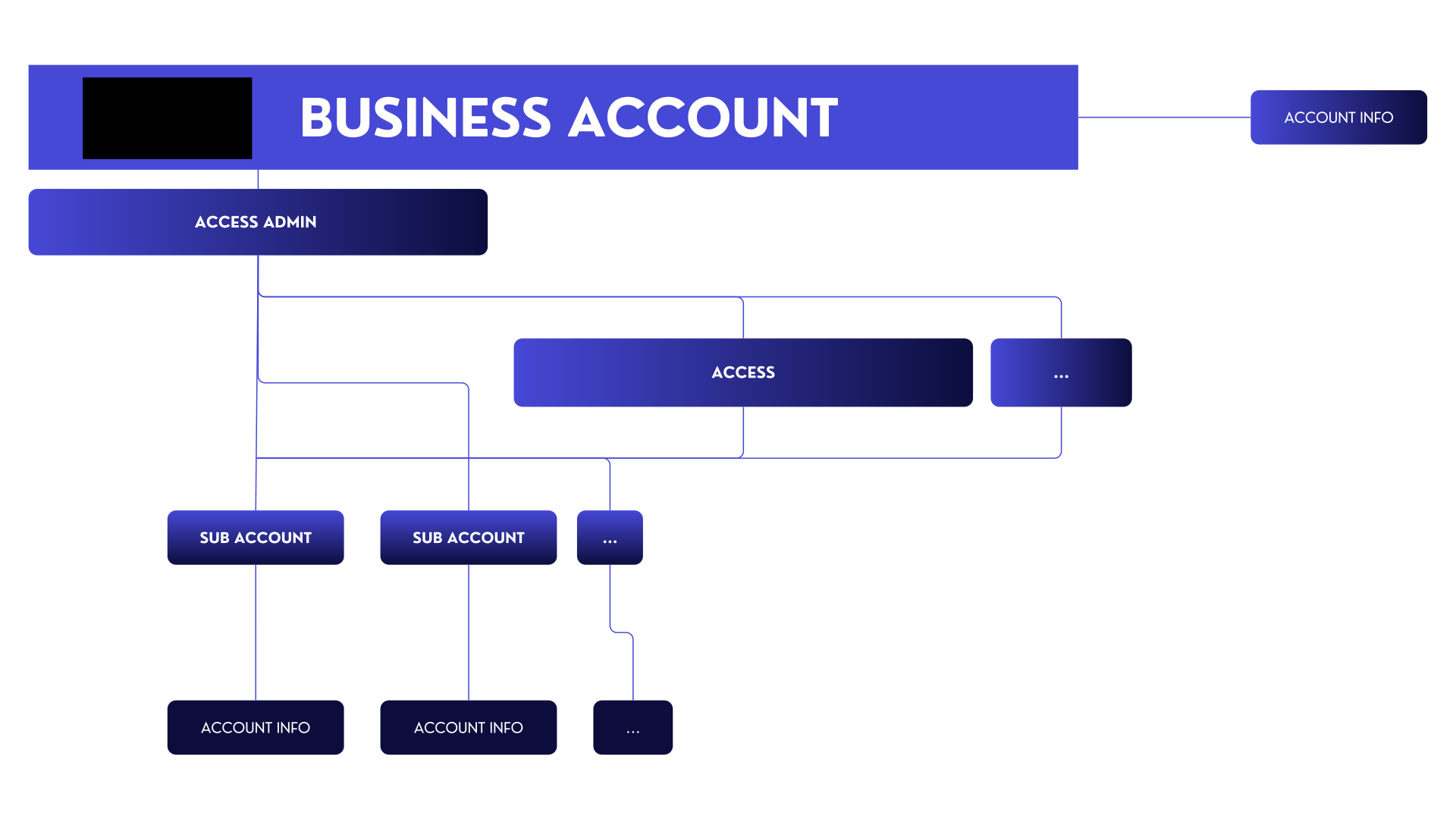
Account Information displays all data associated with your account, including your Avenia deposit wallets, which are automatically created when you set up your Business Account. See Deposit Addresses for how to fund your account with stablecoins.
HTTP GET Request:
https://api.sandbox.avenia.io:10952/v2/account/account-info
Parameters
| Field | Type | Description |
|---|---|---|
subAccountId | string | The ID of your sub-account. Instead of fetching data from your main account, it retrieves data from this sub-account. |
Remember that you can only pass a subAccountId if you have already created a subAccount.
When you create a business account, the Bank Account - BRL is automatically initialized, providing a PIX key (linked to your entire Business Account) and a unique BR Code for each account and subaccount.
cURL Example:
curl -X GET "https://api.sandbox.avenia.io:10952/v2/account/account-info" \
-H "Authorization: Bearer eyJhdXXXXXXXXXXXXXXXXXXXXXXXXXXXXXXXXXXXXXXXXXXXXX"
Sample JSON Response:
{
  "id": "00000000-0000-0000-0000-000000000000",
  "accountInfo": {
    "id": "11111111-1111-1111-1111-111111111111",
    "accountType": "INDIVIDUAL",
    "name": "xxxxx",
    "countrySubdivisionTaxResidence": "BR-SP",
    "countryTaxResidence": "BRA",
    "identityStatus": "CONFIRMED",
    "fullName": "xxxxx",
    "birthdate": "9999-99-30T00:00:00Z",
    "taxId": "99999999999"
  },
  "wallets": [
    {
      "id": "be85cef0-d70a-47cc-9847-9014570efed5",
      "walletAddress": "0xXXXXXXXXXXXXXXXXXXXXXXXXXXXXXXXXXXXXXXXX",
      "chain": "EVM"
    },
    {
      "id": "3f1c2a7e-5b8d-4e6f-9a0b-1c2d3e4f5a6b",
      "walletAddress": "TXXXXXXXXXXXXXXXXXXXXXXXXXXXXXXXXX",
      "chain": "TRON"
    }
  ],
  "pixKey": "11111111-1111-1111-1111-111111111111",
  "brCode": "00020126580014br.gov.bcb.pix013600000000-0000-0000-0000-0000000000005204000053039865802BR5915Avenia API Ltda6009SAO PAULO62070503***6304XXXX",
  "createdAt": "2025-02-18T17:00:39.854943Z"
}
Deposit Addresses
The wallets array returns your account's deposit addresses: one EVM address and one TRON address.
A plain on-chain transfer of a supported token to one of these addresses is credited automatically to your INTERNAL balance. You don't need to create a ticket first: Avenia creates one for the deposit automatically. The asset is kept as sent — USDC is credited as USDC, USDT as USDT.
| Token | Supported networks (production) |
|---|---|
| USDC | Polygon, Base, Ethereum, BNB Chain, Gnosis, Arc |
| USDT | Polygon, Ethereum, BNB Chain, TRON |
Stellar is not supported. Funds sent on Stellar to these addresses are not credited. Only send the tokens and networks listed above.
- Credit timing: the deposit is credited after network confirmations. The funds are available to spend immediately once credited.
- Matching an open ticket: if you have an
UNPAIDticket using theTRANSFERmethod with the same chain, token and exact amount, the deposit settles that ticket instead of creating a new one. - Sender wallet qualification: the sending wallet is recorded as a deposit sender wallet. Wallet qualification does not hold your funds: the deposit is credited whether or not the wallet is qualified.
- Sandbox uses testnets instead of the production networks above.
Account Balance
Here, we’ll retrieve all current balances for your main account or subaccount.
Keep in mind that the operation is still being performed by the subaccount, so it’s also necessary to include the subAccountId parameter here.
HTTP Get Request
https://api.sandbox.avenia.io:10952/v2/account/balances
Example Json Response
{
  "balances": {
    "ARSA": "0",
    "BRLA": "518",
    "EURC": "0",
    "USDC": "1.753243",
    "USDM": "0",
    "USDT": "0"
  }
}
Account Metadata
The Account Metadata endpoint provides configuration flags and currency unlock status for your account or subaccount.
This endpoint returns various account configuration settings, including which currencies are unlocked for operations.
HTTP GET Request
https://api.sandbox.avenia.io:10952/v2/account/metadata
Parameters
| Field | Type | Required | Description |
|---|---|---|---|
subAccountId | string | No | The ID of your sub-account. Instead of fetching data from your main account, it retrieves data from this sub-account. |
cURL Example
curl -X GET "https://api.sandbox.avenia.io:10952/v2/account/metadata" \
-H "Authorization: Bearer eyJhdXXXXXXXXXXXXXXXXXXXXXXXXXXXXXXXXXXXXXXXXXXXXX"
Sample JSON Response
{
   "skipLiveness": false,
   "easierLevel1": false,
   "brlUnlocked": true,
   "usdUnlocked": false,
   "eurUnlocked": false,
   "arsUnlocked": false,
   "copUnlocked": false,
   "mxnUnlocked": false,
   "swiftUsdUnlocked": false
}
Response Fields Explained
| Field | Type | Description |
|---|---|---|
skipLiveness | boolean | Whether liveness check is skipped during KYC |
easierLevel1 | boolean | Whether easier Level 1 KYC requirements are applied |
brlUnlocked | boolean | Whether BRL currency operations are unlocked |
usdUnlocked | boolean | Whether USD currency operations are unlocked |
eurUnlocked | boolean | Whether EUR currency operations are unlocked |
arsUnlocked | boolean | Whether ARS currency operations are unlocked |
copUnlocked | boolean | Whether COP currency operations are unlocked |
mxnUnlocked | boolean | Whether MXN currency operations are unlocked |
swiftUsdUnlocked | boolean | Whether USD operations over the SWIFT rail are unlocked |
Use this endpoint to check which currencies are available for your account before attempting operations.
Access
An Access is linked to account credentials, functioning as a login that grants access tokens. It allows management of both the Business Account and SubAccounts, depending on the assigned permissions.
Each access can create up to 100 additional accesses, but only admin accesses can create new ones.
YOU NEED TO HAVE MFA OTP ENABLED TO CREATE AND EDIT ACCESSES
For the complete API reference (full permission set, subaccount blacklist) see Accesses Management. The sections below are a quick overview of the most common flows.
Access Creation
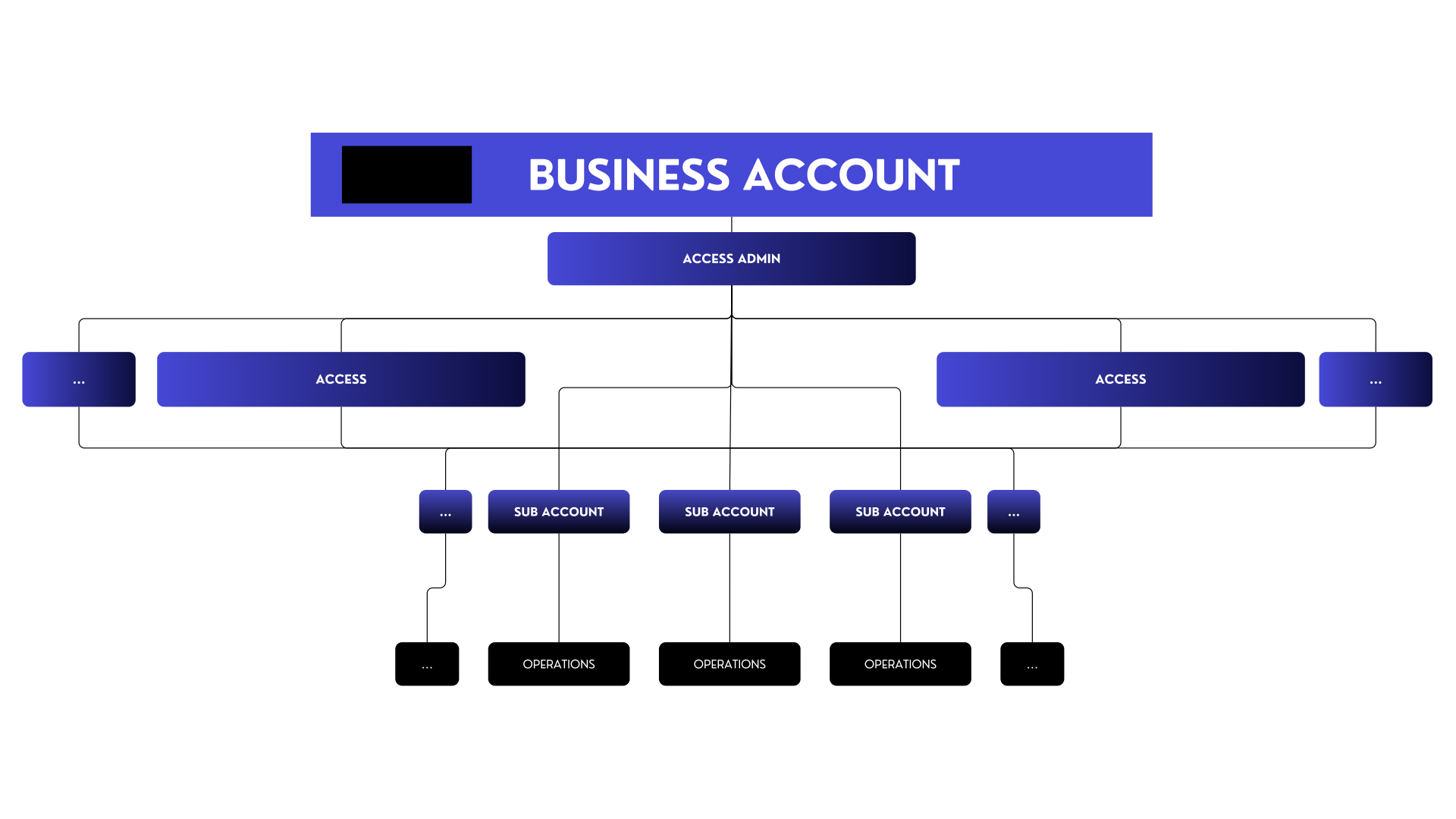
The creation process consists of two steps:
- The Access Admin initiates the creation by providing the email and OTP of the new access. A validation request is then sent to the specified email.
- With the email token, the new access completes the process by setting up a password.
Access Creation (STEP 1)
HTTP POST Request:
https://api.sandbox.avenia.io:10952/v2/auth/accesses/
| Field | Type | Description |
|---|---|---|
otp | string | One-time password required for creation. |
email | string | Email of the new access being created. |
payOut | boolean | Permission for pay-outs (also gates on-chain transfers). |
Sample JSON body:
{
  "otp": "999999",
  "email": "your.new.access.email@provider.com",
  "permissions": {
    "payOut": true
  }
}
cURL Example:
curl -X POST "https://api.sandbox.avenia.io:10952/v2/auth/accesses/" \
-H "Content-Type: application/json" \
-H "Authorization: Bearer eyJhdXXXXXXXXXXXXXXXXXXXXXXXXXXXXXXXXXXXXXXXXXXXXX" \
-d '{
  "otp": "999999",
  "email": "your.new.access.email@provider.com",
  "permissions": {
    "payOut": true
  }
}'
A token will be sent to the provided email to complete the process.
Validation of Access Creation (STEP 2)
HTTP POST Request:
https://api.sandbox.avenia.io:10952/v2/auth/accesses/validate/{token}
| Field | Type | Description |
|---|---|---|
password | string | New password for the access. |
passwordConfirm | string | Must match the password field. |
Sample JSON Body:
{
  "password": "UseAStrongPassword123!",
  "passwordConfirm": "UseAStrongPassword123!"
}
cURL Example:
curl -X POST "https://api.sandbox.avenia.io:10952/v2/auth/accesses/validate/eyJhdXXXXXXXXXXXXXXX" \
-H "Content-Type: application/json" \
-d '{"password": "UseAStrongPassword123!", "passwordConfirm": "UseAStrongPassword123!"}'
Once validated, the new access is ready.
Update Access Permissions
HTTP PATCH Request:
https://api.sandbox.avenia.io:10952/v2/auth/accesses/
Sample JSON Body:
{
  "id": "00000000-0000-0000-0000-000000000000",
  "otp": "999999",
  "permissions": {
    "payOut": true
  }
}
cURL Example:
curl -X PATCH "https://api.sandbox.avenia.io:10952/v2/auth/accesses/" \
-H "Content-Type: application/json" \
-H "Authorization: Bearer eyJhdXXXXXXXXXXXXXXXXXXXXXXXXXXXXXXXXXXXXXXXXXXXXX" \
-d '{ ... }'
View Accesses
HTTP GET Request:
https://api.sandbox.avenia.io:10952/v2/auth/accesses/
| Parameter | Type | Description |
|---|---|---|
email | string | Filters accesses by specified email. |
payOut | boolean | Filters based on pay-out permission. |
cURL Example:
curl -X GET "https://api.sandbox.avenia.io:10952/v2/auth/accesses?email=your.new.access.email@provider.com&payOut=true" \
-H "Authorization: Bearer eyJhdXXXXXXXXXXXXXXXXXXXXXXXXXXXXXXXXXXXXXXXXXXXXX"
Sample JSON Response
{
  "accesses": [
    {
      "id": "00000000-0000-0000-0000-000000000000",
      "email": "your.new.access.email@provider.com",
      "createdAt": "2025-02-07T19:54:17.727744Z",
      "updatedAt": "2025-02-07T19:54:17.727744Z",
      "frozenUntil": "0001-01-01T00:00:00Z",
      "accessPermission": {
        "id": "00000000-0000-0000-0000-000000000000",
        "permissions": {
          "admin": true,
          "payOut": true
        },
        "updatedAt": "2025-02-07T19:54:17.727744Z"
      },
      "mfa": {
        "id": "00000000-0000-0000-0000-000000000000",
        "createdAt": "2025-02-18T00:36:47.329722Z",
        "updatedAt": "2025-02-18T00:36:47.329722Z"
      }
    },
    ...
  ]
}
View a Specific Access
HTTP GET Request:
https://api.sandbox.avenia.io:10952/v2/auth/accesses/{ACCESS_UUID_HERE}
| Field | Type | Description |
|---|---|---|
id | string | The ID of an existing access. |
cURL Example:
curl -X GET "https://api.sandbox.avenia.io:10952/v2/auth/accesses/00000000-0000-0000-0000-000000000000" \
-H "Authorization: Bearer eyJhdXXXXXXXXXXXXXXXXXXXXXXXXXXXXXXXXXXXXXXXXXXXXX"
Sample JSON Response
{
  "id": "00000000-0000-0000-0000-000000000000",
  "email": "your.new.access.email@provider.com",
  "createdAt": "2025-02-07T19:54:17.727744Z",
  "updatedAt": "2025-02-07T19:54:17.727744Z",
  "frozenUntil": "0001-01-01T00:00:00Z",
  "accessPermission": {
    "id": "00000000-0000-0000-0000-000000000000",
    "admin": true,
    "payOut": true,
    "updatedAt": "2025-02-07T19:54:17.727744Z"
  },
  "mfa": {
    "id": "00000000-0000-0000-0000-000000000000",
    "createdAt": "2025-02-18T00:36:47.329722Z",
    "updatedAt": "2025-02-18T00:36:47.329722Z"
  }
}
Delete an Access
HTTP DELETE Request:
https://api.sandbox.avenia.io:10952/v2/auth/accesses/{ACCESS_UUID_HERE}?otp=999999
| Field | Type | Description |
|---|---|---|
id | string | The ID of an existing access. |
otp | string | One-time password (OTP) required to confirm delete. |
cURL Example:
curl -X DELETE "https://api.sandbox.avenia.io:10952/v2/auth/accesses/00000000-0000-0000-0000-000000000000?otp=999999" \
-H "Authorization: Bearer eyJhdXXXXXXXXXXXXXXXXXXXXXXXXXXXXXXXXXXXXXXXXXXXXX"
And that's it. After the OK, that access has been deleted.
Viewing Current Access Information
HTTP GET Request:
https://api.sandbox.avenia.io:10952/v2/account/access-info
cURL Example:
curl -X GET "https://api.sandbox.avenia.io:10952/v2/account/access-info" \
-H "Authorization: Bearer eyJhdXXXXXXXXXXXXXXXXXXXXXXXXXXXXXXXXXXXXXXXXXXXXX"
Account Limits
This guide explains how to retrieve the operational limits for your account or subaccount. Limits are defined monthly and are crucial for understanding your account's transaction capacity.
To view the limits of a subaccount, simply include the subAccountId as a parameter in the request.
Get Account Limits
HTTP GET Request:
https://api.sandbox.avenia.io:10952/v2/account/limits
cURL Example:
curl -X GET "https://api.sandbox.avenia.io:10952/v2/account/limits" \
-H "Authorization: Bearer eyJhdXXXXXXXXXXXXXXXXXXXXXXXXXXXXXXXXXXXXXXXXXXXXX"
Sample JSON Response:
{
  "limitInfo": {
    "blocked": false,
    "createdAt": "2025-07-22T03:24:29.032379Z",
    "limits": [
      {
        "currency": "*",
        "maxFiatIn": "100000",
        "maxFiatOut": "100000",
        "maxChainIn": "100000",
        "maxChainOut": "100000",
        "usedLimit": {
          "year": 2025,
          "month": 7,
          "usedFiatIn": "0",
          "usedFiatOut": "0",
          "usedChainIn": "0",
          "usedChainOut": "0"
        }
      },
      {
        "currency": "BRL",
        "maxFiatIn": "600000",
        "maxFiatOut": "600000",
        "maxChainIn": "600000",
        "maxChainOut": "600000",
        "usedLimit": { "..." }
      },
      {
        "currency": "USD",
        "maxFiatIn": "100000",
        "maxFiatOut": "100000",
        "maxChainIn": "100000",
        "maxChainOut": "100000",
        "usedLimit": { "..." }
      }
    ]
  }
}
Response Fields Explained
The response contains a limitInfo object with the following fields:
| Field | Type | Description |
|---|---|---|
blocked | boolean | If true, all operations for this account are blocked due to limit restrictions. |
createdAt | string | The timestamp when the limit information was generated. |
limits | array of objects | An array containing limit details for different currencies. |
Each object inside the limits array has the following structure:
| Field | Type | Description |
|---|---|---|
currency | string | The currency of the limit. A value of * represents the global limit, which is consumed by any operation in any currency, expressed in USD. Other values (e.g., BRL, USD) represent specific limits for operations conducted in that currency. |
maxFiatIn | string | The maximum monthly limit for fiat deposits. |
maxFiatOut | string | The maximum monthly limit for fiat withdrawals. |
maxChainIn | string | The maximum monthly limit for on-chain deposits. |
maxChainOut | string | The maximum monthly limit for on-chain withdrawals. |
usedLimit | object | An object detailing the consumed limit for the current month (year, month), broken down by operation type (usedFiatIn, usedFiatOut, etc.). The values are expressed in the specified currency. |
Currency-specific limits are expressed in their own value. For example, a maxFiatIn of 100000000 for the ARS currency means a limit of 100 million Argentine Pesos.
Conclusion
You have learned how to manage Account Information and Accesses, including:
- ✅ Retrieving Account Information
- ✅ Checking Account Balances
- ✅ Retrieving Account Metadata
- ✅ Managing Accesses
- ✅ Creating and Validating a New Access
- ✅ Updating Access Permissions
- ✅ Viewing Accesses
- ✅ Deleting an Access
- ✅ Checking Your Current Access Information
- ✅ Get account limits
Following these steps provides a structured approach to handling authentication, authorization, and account management.