Quotes and Tickets
Basic Concepts
What is a Quote
A quote is the first step for any transaction. It calculates the price, fees, and validity before execution.
Flow:
- Request → Send transaction parameters
- Calculation → System calculates price, fees, and validity
- Response → Receive
quoteTokento use in the ticket
What is a Ticket
A ticket executes the transaction using the quoteToken obtained from the quote.
Flow:
- Creation → Use
quoteToken+ specific parameters - Execution → System processes the transaction
- Monitoring → Track status until completion
Ticket Lifecycle
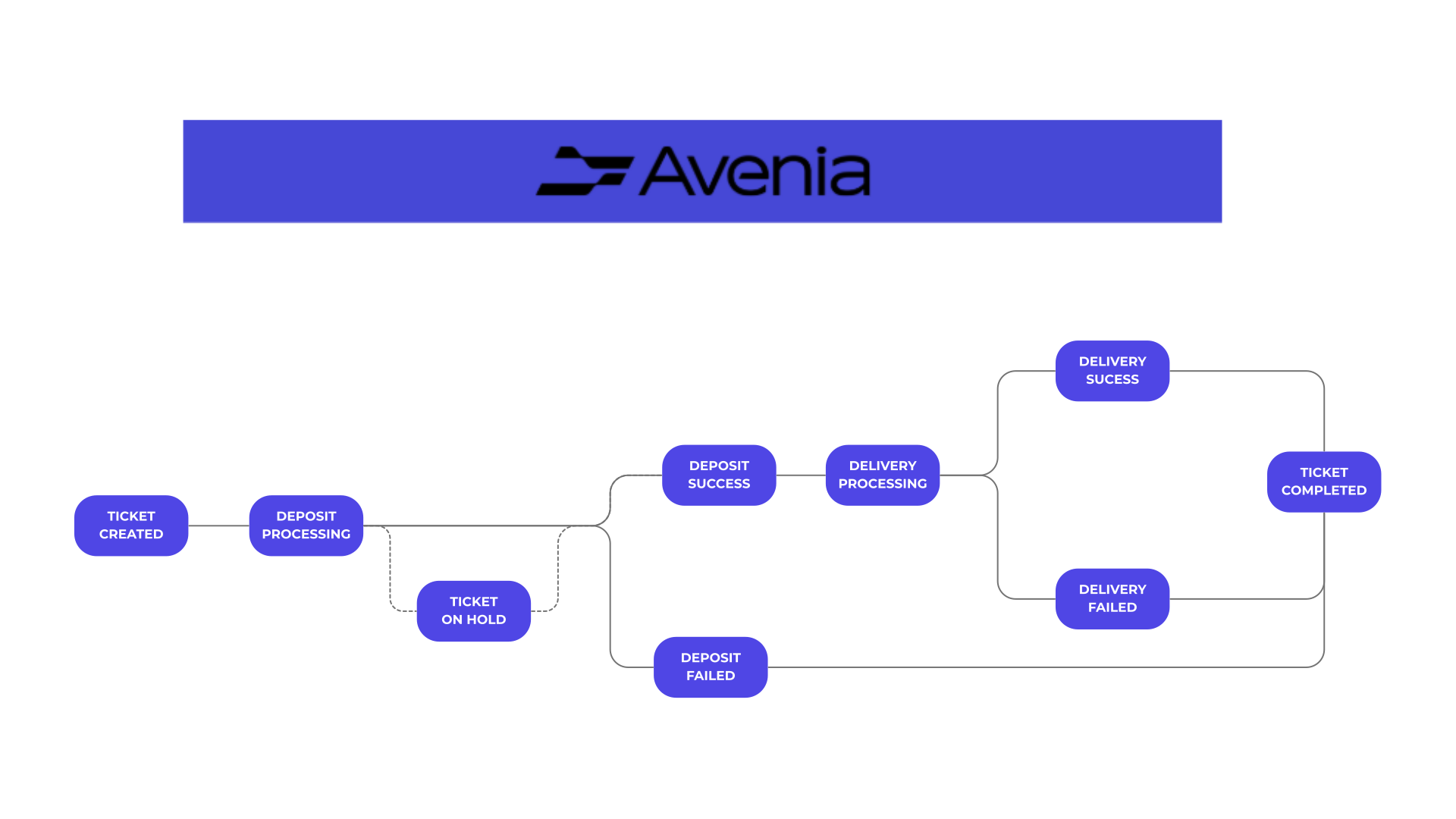
About TICKET-ON-HOLD (dotted path): An optional pause during deposit processing, triggered when our risk engine flags a ticket for compliance review before the deposit is settled. You'll receive a TICKET-ON-HOLD webhook and the reason field will read "Asset delivery temporarily held for compliance review.". The ticket then resolves in one of three ways:
- Approved → moves to
DEPOSIT-SUCCESSand proceeds toDELIVERY-PROCESSINGnormally. - Auto-approved (review window elapses) → same as approved.
- Rejected → moves to
DEPOSIT-FAILEDwhen the deposit can be refunded to the sender (BRL/PIX) or when the input is an Avenia balance (INTERNAL), which is simply returned. Otherwise the ticket ends inPARTIAL-FAILEDand the full input amount is credited to your Avenia Wallet in the input currency; no conversion is performed.
Deposit validation before credit
Before crediting a BRL/PIX deposit, Avenia runs compliance and limit checks. If any check rejects the deposit, no output asset is credited. The ticket moves to FAILED, a DEPOSIT-FAILED webhook is sent, and Avenia starts an asynchronous refund of the full input amount to the originating account. The refund may still be processing after the failure webhook, so integrations should wait for the final ticket state or TICKET-COMPLETE before presenting the operation as fully settled.
The ticket's failureReason identifies the customer-facing outcome. Common examples include:
failureReason | Meaning |
|---|---|
user does not have enough limit | The available BRL input limit was insufficient. |
third party deposit is not allowed for this user | The account's third-party pay-in policy rejected the sender. |
deposit could not be verified, funds returned | The checks could not be completed, so the deposit was returned. |
Compliance rejections include a reason in failureReason. The ticket reason may initially be Refund in progress. and is updated to include the refund E2E ID when the return completes.
For operations on behalf of a sub-account, simply add the subAccountId parameter to both the quote and ticket. The values must be identical in both calls.
API Reference - Quotes
Endpoint
GET /v2/account/quote/fixed-rate
Parameters
Required Parameters
| Field | Type | Description |
|---|---|---|
inputCurrency | string | The currency you are paying with |
inputPaymentMethod | string | The payment method you are using |
outputCurrency | string | The currency you want to receive |
outputPaymentMethod | string | The method you want to receive funds |
inputAmount | decimal (string) | The amount you want to pay/deposit. Required if outputAmount is not provided. |
outputAmount | decimal (string) | The amount you want to receive. Required if inputAmount is not provided. |
inputThirdParty | bool | Reserved field. Send false. See Third Party Fields. |
outputThirdParty | bool | Reserved field. Send false. See Third Party Fields. |
blockchainSendMethod | string | Defines the blockchain transaction type. Can be TRANSFER or PERMIT. Required for blockchain inputs. |
Optional Parameters
| Field | Type | Description |
|---|---|---|
markupFloatingFee | decimal (string) | A percentage fee added on top of the transaction. Example: 0.01 for 1%. |
markupInputFixedFee | decimal (string) | A fixed fee applied to the input amount. Example: 10.00 in all input operations. |
markupOutputFixedFee | decimal (string) | A fixed fee applied to the output amount. Example: 5.00 in all output operations. |
markupCurrency | string | The currency in which the markup fee will be charged. Example: BRLA, USDC or USDT. |
subAccountId | string | The sub-account ID to perform the operation on behalf of. |
Either inputAmount or outputAmount must be provided, but not both at the same time.
Example
# Regular quote
curl -X GET "https://api.sandbox.avenia.io:10952/v2/account/quote/fixed-rate" \
-H "Content-Type: application/json" \
-H "Authorization: Bearer eyJhdXXXXXXXXXXXXXXXXXXXXXXXXXXXXXXXXXXXXXXXXXXXXX" \
-G \
--data-urlencode "inputCurrency=BRL" \
--data-urlencode "inputPaymentMethod=PIX" \
--data-urlencode "inputAmount=100" \
--data-urlencode "outputCurrency=BRLA" \
--data-urlencode "outputPaymentMethod=POLYGON"

# Quote for sub-account
curl -X GET "https://api.sandbox.avenia.io:10952/v2/account/quote/fixed-rate" \
-H "Content-Type: application/json" \
-H "Authorization: Bearer eyJhdXXXXXXXXXXXXXXXXXXXXXXXXXXXXXXXXXXXXXXXXXXXXX" \
-G \
--data-urlencode "inputCurrency=BRL" \
--data-urlencode "inputPaymentMethod=PIX" \
--data-urlencode "inputAmount=100" \
--data-urlencode "outputCurrency=BRLA" \
--data-urlencode "outputPaymentMethod=POLYGON" \
--data-urlencode "subAccountId=YOUR_SUB_ACCOUNT_ID"
Response
{
  "quoteToken": "eyJhdXXXXXXXXXXXXXXXXXXXXXXXXXXXXXXXXXXXXXXXXXXXXX",
  "inputCurrency": "BRL",
  "inputPaymentMethod": "PIX",
  "inputAmount": "100",
  "outputCurrency": "BRLA",
  "outputPaymentMethod": "POLYGON",
  "outputAmount": "99.749583",
  "markupAmount": "0",
  "markupCurrency": "",
  "inputThirdParty": false,
  "outputThirdParty": false,
  "appliedFees": [
    {
      "type": "Markup Fee",
      "description": "Total markup fees represented in the input currency.",
      "amount": "0",
      "currency": "BRL"
    },
    {
      "type": "In Fee",
      "description": "Fees due to input currency and input payment method.",
      "amount": "0.2",
      "currency": "BRL"
    },
    {
      "type": "Conversion Fee",
      "description": "Fees due to conversion from input currency to output currency.",
      "amount": "0",
      "currency": "BRL"
    },
    {
      "type": "Out Fee",
      "description": "Fees due to output currency and output payment method.",
      "amount": "0.05",
      "currency": "BRL"
    },
    {
      "type": "Gas Fee",
      "description": "Fees due to blockchain transaction costs.",
      "amount": "0.000417",
      "currency": "BRL"
    }
  ],
  "basePrice": "1",
  "pairName": "BRLBRLA"
}
API Reference - Tickets
Endpoint
POST /v2/account/tickets/
Base Body
| Field | Type | Required | Description |
|---|---|---|---|
quoteToken | string | ✅ | The quote token received from the quote response. Each token creates at most one ticket — see Idempotency and safe retries. |
externalId | string | ❌ | A free-form reference (max 68 characters) for reconciliation in your system. It is not unique and not an idempotency key. |
Additional Fields by Operation Type
For PIX Input
{
  "quoteToken": "eyJhdXXXXXXXXXXXXXXXXXXXXXXXXXXXXXXXXXXXXXXXXXXXXX",
  "externalId": "your-reference-id",
  "ticketBrlPixInput": {
    "additionalData": "optional PIX message"
  }
}
| Field | Type | Required | Description |
|---|---|---|---|
additionalData | string | ❌ | Additional information in the PIX transaction. |
For Blockchain Input (PERMIT)
{
  "quoteToken": "eyJhdXXXXXXXXXXXXXXXXXXXXXXXXXXXXXXXXXXXXXXXXXXXXX",
  "externalId": "your-reference-id",
  "ticketBlockchainInput": {
    "walletAddress": "0xXXXXXXXXXXXXXXXXXXXXXXXXXXXXXXXXXXXXXXXX",
    "permit": {
      "r": "0xXXXXXXXXXXXXXXXXXXXXXXXXXXXXXXXXXXXXXXXX",
      "s": "0xXXXXXXXXXXXXXXXXXXXXXXXXXXXXXXXXXXXXXXXX",
      "v": 1,
      "nonce": 1,
      "deadline": 1234567890
    }
  }
}
| Field | Type | Required | Description |
|---|---|---|---|
walletAddress | string | ✅ | The wallet address that will be sending the tokens. |
permit.r | string | ✅ | The r component of the permit signature. |
permit.s | string | ✅ | The s component of the permit signature. |
permit.v | number | ✅ | The v component of the permit signature. |
permit.nonce | number | ✅ | The nonce value for the permit signature. |
permit.deadline | number | ✅ | The deadline timestamp for the permit signature. |
For Blockchain Input (Personal Signature)
{
  "quoteToken": "eyJhdXXXXXXXXXXXXXXXXXXXXXXXXXXXXXXXXXXXXXXXXXXXXX",
  "externalId": "your-reference-id",
  "ticketBlockchainInput": {
    "walletAddress": "0xXXXXXXXXXXXXXXXXXXXXXXXXXXXXXXXXXXXXXXXX",
    "personal": {
      "signature": "0xXXXXXXXXXXXXXXXXXXXXXXXXXXXXXXXXXXXXXXXX",
      "deadline": 1234567890
    }
  }
}
| Field | Type | Required | Description |
|---|---|---|---|
walletAddress | string | ✅ | The wallet address that will be sending the tokens. |
personal.signature | string | ✅ | The personal signature for the transaction. |
personal.deadline | number | ✅ | The deadline timestamp for the signature. |
If the wallet you specify is an Avenia Wallet, you do not need to include the PERMIT or TRANSFER fields.
For Blockchain Output
{
  "quoteToken": "eyJadXXXXXXXXXXXXXXXXXXXXXXXXXXXXXXXXXXXXXXXXXXXXX",
  "externalId": "your-reference-id",
  "ticketBlockchainOutput": {
    "beneficiaryWalletId": "00000000-0000-0000-0000-000000000000"
  }
}
| Field | Type | Required | Description |
|---|---|---|---|
beneficiaryWalletId | string | ✅ | The ID of the registered beneficiary wallet that will receive the funds. |
For Blockchain Output (Direct)
{
  "quoteToken": "eyJadXXXXXXXXXXXXXXXXXXXXXXXXXXXXXXXXXXXXXXXXXXXXX",
  "externalId": "your-reference-id",
  "ticketBlockchainOutput": {
    "walletChain": "CELO",
    "walletAddress": "0x0000000000000000000000000000000000000000",
    "walletMemo": "optional memo"
  }
}
| Field | Type | Required | Description |
|---|---|---|---|
walletChain | string | ✅ | The blockchain network of the destination wallet (e.g., CELO, POLYGON, ETHEREUM). |
walletAddress | string | ✅ | The public address of the destination wallet. |
walletMemo | string | ❌ | A memo or tag required by certain wallets or exchanges. |
For PIX Output
{
  "quoteToken": "eyJadXXXXXXXXXXXXXXXXXXXXXXXXXXXXXXXXXXXXXXXXXXXXX",
  "externalId": "your-reference-id",
  "ticketBrlPixOutput": {
    "beneficiaryBrlBankAccountId": "00000000-0000-0000-0000-000000000000",
    "pixMessage": "optional PIX message"
  }
}
| Field | Type | Required | Description |
|---|---|---|---|
beneficiaryBrlBankAccountId | string | ✅ | The ID of the beneficiary account that this PIX belongs to. |
pixMessage | string | ❌ | A message you want to be sent in the PIX. |
For USD WIRE Output
{
  "quoteToken": "eyJadXXXXXXXXXXXXXXXXXXXXXXXXXXXXXXXXXXXXXXXXXXXXX",
  "externalId": "your-reference-id",
  "ticketUsdWireOutput": {
    "beneficiaryUsdBankAccountId": "00000000-0000-0000-0000-000000000000"
  }
}
| Field | Type | Required | Description |
|---|---|---|---|
beneficiaryUsdBankAccountId | string | ✅ | The ID of the beneficiary account that this WIRE transfer belongs to. |
For USD ACH Output
{
  "quoteToken": "eyJadXXXXXXXXXXXXXXXXXXXXXXXXXXXXXXXXXXXXXXXXXXXXX",
  "externalId": "your-reference-id",
  "ticketUsdOutput": {
    "beneficiaryUsdBankAccountId": "00000000-0000-0000-0000-000000000000",
    "achReference": "optional ACH reference"
  }
}
| Field | Type | Required | Description |
|---|---|---|---|
beneficiaryUsdBankAccountId | string | ✅ | The ID of the beneficiary account that this ACH transfer belongs to. |
achReference | string | ❌ | A reference code you want to be sent with the ACH transfer. |
For EUR SEPA Output
{
  "quoteToken": "eyJadXXXXXXXXXXXXXXXXXXXXXXXXXXXXXXXXXXXXXXXXXXXXX",
  "externalId": "your-reference-id",
  "ticketEurSepaOutput": {
    "beneficiaryEurBankAccountId": "00000000-0000-0000-0000-000000000000",
    "sepaReference": "optional SEPA reference"
  }
}
| Field | Type | Required | Description |
|---|---|---|---|
beneficiaryEurBankAccountId | string | ✅ | The ID of the beneficiary account that this SEPA transfer belongs to. |
sepaReference | string | ❌ | A reference you want to be sent with the SEPA transfer. |
For COP Input (Bre-B)
{
  "quoteToken": "eyJadXXXXXXXXXXXXXXXXXXXXXXXXXXXXXXXXXXXXXXXXXXXXX",
  "externalId": "your-reference-id",
  "ticketCopInput": {
    "additionalData": "optional reference shown on the transfer"
  }
}
| Field | Type | Required | Description |
|---|---|---|---|
additionalData | string | ❌ | Free-text reference carried with the Bre-B transfer. Max 256 characters. Bre-B only — it has no effect on PSE (BANK-TRANSFER) payins. |
For COP Output
{
  "quoteToken": "eyJadXXXXXXXXXXXXXXXXXXXXXXXXXXXXXXXXXXXXXXXXXXXXX",
  "externalId": "your-reference-id",
  "ticketCopOutput": {
    "beneficiaryCopBankAccountId": "00000000-0000-0000-0000-000000000000"
  }
}
| Field | Type | Required | Description |
|---|---|---|---|
beneficiaryCopBankAccountId | string | ⚠️ | The ID of the registered COP beneficiary that will receive the funds. |
breBKey | string | ⚠️ | A Bre-B key to pay out to directly, without registering a beneficiary. |
Send exactly one of beneficiaryCopBankAccountId or breBKey. Sending both returns ticketCopOutput is invalid; sending neither leaves the payout with no destination.
For ARS Input
{
  "quoteToken": "eyJadXXXXXXXXXXXXXXXXXXXXXXXXXXXXXXXXXXXXXXXXXXXXX",
  "externalId": "your-reference-id",
  "ticketArsInput": {
    "senderAccountNumber": "0000003100010000000001"
  }
}
| Field | Type | Required | Description |
|---|---|---|---|
senderAccountNumber | string | ✅ | The end-user's own CVU or CBU — the account the ARS transfer will be sent from. Exactly 22 digits. The deposit only settles if it arrives from this account. |
For ARS Output
{
  "quoteToken": "eyJadXXXXXXXXXXXXXXXXXXXXXXXXXXXXXXXXXXXXXXXXXXXXX",
  "externalId": "your-reference-id",
  "ticketArsOutput": {
    "beneficiaryArsBankAccountId": "00000000-0000-0000-0000-000000000000"
  }
}
| Field | Type | Required | Description |
|---|---|---|---|
beneficiaryArsBankAccountId | string | ✅ | The ID of the registered ARS beneficiary (CVU or CBU) that will receive the funds. |
For MXN Output
{
  "quoteToken": "eyJadXXXXXXXXXXXXXXXXXXXXXXXXXXXXXXXXXXXXXXXXXXXXX",
  "externalId": "your-reference-id",
  "ticketMxnOutput": {
    "beneficiaryMxnBankAccountId": "00000000-0000-0000-0000-000000000000"
  }
}
| Field | Type | Required | Description |
|---|---|---|---|
beneficiaryMxnBankAccountId | string | ✅ | The ID of the registered MXN beneficiary (CLABE) that will receive the funds. |
MXN payins take no input block. Unlike ARS, there is no sender account to declare — send only quoteToken (and optionally externalId) plus your blockchain output block.
For Markup
{
  "quoteToken": "eyJadXXXXXXXXXXXXXXXXXXXXXXXXXXXXXXXXXXXXXXXXXXXXX",
  "externalId": "your-reference-id",
  "ticketMarkupInput": {
    "markupWalletAddress": "0xXXXXXXXXXXXXXXXXXXXXXXXXXXXXXXXXXXXXXXXX"
  }
}
| Field | Type | Required | Description |
|---|---|---|---|
markupWalletAddress | string | ✅ (optional when the markup is locked to the main account) | Your Avenia Wallet address to receive the markup. |
The markup must be sent to your Avenia Wallet, which belongs to your Business Account (BA) or sub-account if applicable. Avenia will automatically route the markup amount to this wallet.
Markup locked to the main account
Accounts where operators create tickets on behalf of the business can ask Avenia to lock the markup to the main account. The lock covers the whole account: tickets of the main account and of every sub-account. Only Avenia turns it on or off; it cannot be changed through the API.
With the lock on, for every ticket whose quote carries a markup:
markupWalletAddress | Result |
|---|---|
| omitted or empty | The markup goes to the main account's Avenia Wallet. |
| an Avenia Wallet of the main account | Accepted. |
| any other wallet, including a sub-account's | Refused with HTTP 400. |
The markup amount is unaffected: markupFloatingFee, markupInputFixedFee, markupOutputFixedFee and markupCurrency are still chosen on each quote.
A ticket that names another wallet is refused:
{
  "error": "InvalidFieldError: ticketMarkupInput.markupWalletAddress is invalid",
  "extraInfo": "markup is locked to the main account's wallet for this account"
}
On a locked account, simply omit ticketMarkupInput. The ticket's markupInfo.markupWalletAddress shows the wallet that received the markup.
API Reference - Tickets Management
Get All Tickets
This endpoint allows you to retrieve the entire history of created tickets.
Endpoint
GET /v2/account/tickets/
Parameters
| Parameter | Type | Description |
|---|---|---|
subAccountId | string | Filter by sub-account ID |
createdAfter | int64 | Unix epoch timestamp in milliseconds (UTC). Returns tickets whose creation time is on or after this instant (createdAt >= createdAfter). See the timestamp note below. |
createdBefore | int64 | Unix epoch timestamp in milliseconds (UTC). Returns tickets whose creation time is strictly before this instant (createdAt < createdBefore). See the timestamp note below. |
cursor | string | Used for pagination |
status | string | Filter tickets by their current status (PENDING, PAID, etc.) |
inputCurrency | string | Filter by the input currency used in the ticket |
outputCurrency | string | Filter by the output currency received in the ticket |
outputPaymentMethod | string | Filter by the payment method used for the output |
endToEndId | string | Filter by identifier assigned to each PIX transaction |
externalId | string | Filter by the externalId you set on ticket creation (exact match). Because externalId is not unique, this can return zero, one or several tickets. |
The createdAfter / createdBefore filters and the createdAt field returned in the response use different formats, and both are always expressed in UTC. This is the most common source of "why is this ticket outside my range?" confusion, so read this carefully.
- Filter inputs (
createdAfter,createdBefore) are Unix epoch timestamps in milliseconds, UTC — 13 digits for current dates (e.g.1769990400000). They are not seconds (10 digits) and not date strings. If you have a value in seconds, multiply it by 1000. - The filter is applied to each ticket's own creation instant, with an inclusive lower bound (
createdAt >= createdAfter) and an exclusive upper bound (createdAt < createdBefore). - The returned
createdAtis an RFC3339 UTC timestamp string ending inZ(e.g.2026-05-01T03:59:56.109Z). - Results are ordered newest first (by
createdAtdescending), so the tickets closest to yourcreatedBeforeboundary appear at the top of the first page.
Because everything is in UTC, a boundary you build from a local calendar date lands a few hours into the next UTC day when your zone is behind UTC. For example, for a client in Brazil (UTC−3), createdBefore=1777607999999 is 2026-05-01T03:59:59.999Z in UTC — which is the end of April 30 in Brazil local time. A ticket returned with createdAt=2026-05-01T03:59:56.109Z (epoch 1777607996109) is correctly in range, because its epoch is less than createdBefore, even though its UTC date string reads "May 1". Ordered newest-first, such tickets sit at the top of the page and can look out of range at a glance — but they are not.
Recommendations
- Convert your local date/time boundaries to UTC before computing the millisecond epoch for
createdAfter/createdBefore. - When checking whether a returned ticket falls in your range, compare its
createdAtas epoch milliseconds (or convert it to your own time zone) rather than eyeballing the date portion of the UTC string. - Watch for the seconds-vs-milliseconds pitfall: a 10-digit epoch is seconds — multiply by 1000 to get the milliseconds this endpoint expects.
Example
curl -X GET "https://api.sandbox.avenia.io:10952/v2/account/tickets/" \
-H "Content-Type: application/json" \
-H "Authorization: Bearer eyJhdXXXXXXXXXXXXXXXXXXXXXXXXXXXXXXXXXXXXXXXXXXXXX" \
-G \
--data-urlencode "subAccountId=YOUR_SUB_ACCOUNT_ID" \
--data-urlencode "status=PAID"
Sample JSON Response
The response is an object with a tickets array and a pagination cursor. Each ticket carries the identifiers you can use to match Avenia records against your own: the top-level id (Avenia ticket ID), externalId (your reference, if you set one on ticket creation), and — for PIX operations — the endToEndId inside the relevant fiat sender/receiver block.
Each ticket only includes the sender/receiver blocks relevant to its operation type (e.g. a PIX-in → crypto-out ticket has brazilianFiatSenderInfo + blockchainReceiverInfo); irrelevant blocks are omitted.
{
  "tickets": [
    {
      "id": "8f2c1e4a-9b3d-4c7e-a1f6-2d5b8c0e4a91",
      "externalId": "your-reference-id",
      "workspaceId": "b2d1f0c4-7a3e-4d2b-9c1f-0e8a6b4d2c10",
      "userId": "a1c3e5f7-2b4d-6e8a-0c2e-4f6a8b0d2e40",
      "status": "PAID",
      "reason": "",
      "failureReason": "",
      "createdAt": "2025-04-01T23:00:01.123456Z",
      "updatedAt": "2025-04-01T23:01:34.335504Z",
      "expiresAt": "2025-04-01T23:10:01.123456Z",
      "quote": {
        "inputCurrency": "BRL",
        "inputPaymentMethod": "PIX",
        "inputAmount": "1000",
        "outputCurrency": "USDC",
        "outputPaymentMethod": "POLYGON",
        "outputAmount": "180.500000",
        "markupCurrency": "USDC",
        "markupAmount": "0",
        "sendMethod": "PIX",
        "inputThirdParty": false,
        "outputThirdParty": false,
        "basePrice": "5.540000",
        "appliedFees": [
          {
            "type": "MARKUP",
            "description": "Markup fee",
            "amount": "0",
            "currency": "USDC",
            "rebatable": false
          }
        ],
        "pairName": "BRLUSDC",
        "outputBrCode": "",
        "ticketRefundId": "",
        "createdAt": "2025-04-01T22:59:50.000000Z"
      },
      "brazilianFiatSenderInfo": {
        "referenceLabel": "",
        "additionalData": "",
        "name": "John Doe",
        "taxId": "12345678901",
        "bankCode": "00000000",
        "branchCode": "0001",
        "accountNumber": "1234567",
        "accountType": "CHECKING",
        "pixMessage": "",
        "endToEndId": "E000000002025040123010000000000001",
        "brCode": ""
      },
      "blockchainReceiverInfo": {
        "walletAddress": "0xAbC1234567890dEf1234567890AbCdEf12345678",
        "walletChain": "POLYGON",
        "walletMemo": "",
        "txHash": "0x9f8e7d6c5b4a39281706f5e4d3c2b1a09f8e7d6c5b4a39281706f5e4d3c2b1a0"
      }
    }
  ],
  "cursor": "MjgzLTE3NDM1MTU4MjA4MDY="
}
When the response cursor is non-empty, pass it back as the cursor query param to fetch the next page; keep paging until tickets comes back empty.
Get Ticket by ID
Retrieve a specific ticket by its unique identifier.
Endpoint
GET /v2/account/tickets/{ticket-id}
Parameters
| Parameter | Type | Description |
|---|---|---|
ticket-id | string | The unique identifier of the ticket |
Example
curl -X GET "https://api.sandbox.avenia.io:10952/v2/account/tickets/TICKET-UUID-HERE" \
-H "Content-Type: application/json" \
-H "Authorization: Bearer eyJhdXXXXXXXXXXXXXXXXXXXXXXXXXXXXXXXXXXXXXXXXXXXXX"
Sample JSON Response
Returns a single ticket object with the same fields as each element of the tickets array in Get All Tickets (no tickets/cursor wrapper).
Create Ticket
Create a new ticket using a quote token.
Endpoint
POST /v2/account/tickets/
Body Parameters
| Field | Type | Required | Description |
|---|---|---|---|
quoteToken | string | ✅ | The quote token received from the quote response. Each token creates at most one ticket — see Idempotency and safe retries. |
externalId | string | ❌ | A free-form reference (max 68 characters) for reconciliation in your system. It is not unique and not an idempotency key. |
Example
curl -X POST "https://api.sandbox.avenia.io:10952/v2/account/tickets/" \
-H "Content-Type: application/json" \
-H "Authorization: Bearer eyJhdXXXXXXXXXXXXXXXXXXXXXXXXXXXXXXXXXXXXXXXXXXXXX" \
-d '{
  "quoteToken": "eyJhdXXXXXXXXXXXXXXXXXXXXXXXXXXXXXXXXXXXXXXXXXXXXX",
  "externalId": "your-reference-id"
}'
Idempotency and safe retries
externalId is not an idempotency key. It is a free-form reference (max 68 characters) that you can use to reconcile Avenia tickets with your own records. Avenia does not enforce uniqueness: creating a ticket twice with the same externalId (each time with a new quote) creates two tickets.
The quoteToken is the once-only key. One quote token creates at most one ticket:
Situation when you re-send a quoteToken | Response |
|---|---|
| The token is still valid and a ticket was already created with it | 400 with {"error":"cannot reuse quote token"} — this means the first request did create a ticket. |
| The token has expired (quote tokens are valid for 15 seconds) | 400 with quoteToken is invalid. |
Recommended retry pattern
If a create-ticket response is lost (timeout, dropped connection), do not blindly request a new quote and create again — the first ticket may already exist. Instead:
- Use a unique
externalIdfor every payout you create. - If the create response is lost, look the ticket up by that reference:
This filter is an exact match and may return zero, one or several tickets.
curl -X GET "https://api.sandbox.avenia.io:10952/v2/account/tickets/?externalId=your-reference-id" \
-H "Authorization: Bearer eyJhdXXXXXXXXXXXXXXXXXXXXXXXXXXXXXXXXXXXXXXXXXXXXX" - If a ticket is returned, do not create it again. Follow it with Get Ticket by ID (
GET /v2/account/tickets/{ticketId}) or through webhooks. - Only if the list is empty, request a new quote and create the ticket again with the same
externalId.
Cancel Ticket
Cancel a ticket that is still awaiting payment — useful when a ticket was created by mistake or you changed your mind before sending the funds.
Only tickets in the UNPAID state can be canceled. Once a ticket has moved to PROCESSING (or any later state), it can no longer be canceled.
Endpoint
PATCH /v2/account/tickets/{ticket-id}/cancel
Parameters
| Parameter | Type | Description |
|---|---|---|
ticket-id | string | The unique identifier of the ticket to cancel |
subAccountId | string | Optional. Cancel a ticket that belongs to a sub-account |
Example
curl -X PATCH "https://api.sandbox.avenia.io:10952/v2/account/tickets/TICKET-UUID-HERE/cancel" \
-H "Content-Type: application/json" \
-H "Authorization: Bearer eyJhdXXXXXXXXXXXXXXXXXXXXXXXXXXXXXXXXXXXXXXXXXXXXX"
Response
On success the endpoint returns 200 OK with an empty body, and the ticket's state becomes CANCELED.
If the ticket does not exist, is already canceled, or is no longer UNPAID, the endpoint returns 400 Bad Request:
{
  "error": "ticket not found, already canceled, or not eligible for cancellation"
}
Verifying Blocked Institutions
Before creating a BRL ticket, you can check whether the counterparty bank is blocked for your account. Our risk engine maintains a deny-list of banks (by ISPB) that are blocked for pay-in and/or pay-out.
What happens when a blocked institution is involved depends on the direction:
| Direction | Outcome |
|---|---|
| Pay-out to a blocked institution | The delivery fails. The ticket ends in PARTIAL-FAILED, failureReason reports receiver bank institution is blocked, you get a DELIVERY-PARTIAL-FAILED webhook, and the tokens are returned to your wallet. |
| Pay-in from a blocked institution | The deposit is returned to the sender and never pays the ticket, which stays UNPAID until you cancel it. No webhook is emitted for this. |
Checking up front lets you fail fast and pick a different institution instead. You can rehearse the pay-out case in sandbox — see Magic Values.
Banks explicitly allowed for your account are left out of the list.
Endpoint
GET /v2/account/bank-accounts/brl/blacklisted-ispbs
By default the scope is the authenticated account.
Parameters
| Parameter | Type | Description |
|---|---|---|
subAccountId | string | Optional. Return the blocked ISPBs resolved for a sub-account instead of the main account |
Example
# Main account
curl "https://api.sandbox.avenia.io:10952/v2/account/bank-accounts/brl/blacklisted-ispbs" \
-H "Authorization: Bearer eyJhdXXXXXXXXXXXXXXXXXXXXXXXXXXXXXXXXXXXXXXXXXXXXX"

# For a sub-account
curl "https://api.sandbox.avenia.io:10952/v2/account/bank-accounts/brl/blacklisted-ispbs?subAccountId=SUB-ACCOUNT-UUID-HERE" \
-H "Authorization: Bearer eyJhdXXXXXXXXXXXXXXXXXXXXXXXXXXXXXXXXXXXXXXXXXXXXX"
Response
200 OK with the blocked ISPBs, grouped by ispb with the operations each is blocked for:
{
  "ispbs": [
    {
      "ispb": "12345678",
      "bankName": "EXAMPLE BANK S.A.",
      "blockedOperations": ["PAY-IN-COUNTERPARTY", "PAY-OUT-COUNTERPARTY"]
    },
    {
      "ispb": "87654321",
      "bankName": "ANOTHER BANK S.A.",
      "blockedOperations": ["PAY-OUT-COUNTERPARTY"]
    }
  ]
}
| Field | Type | Description |
|---|---|---|
ispb | string | The 8-digit ISPB code identifying the bank |
bankName | string | Human-readable name of the bank (may be empty if the ISPB is unknown) |
blockedOperations | string[] | The operations this bank is blocked for |
blockedOperations values:
| Value | Meaning |
|---|---|
PAY-IN-COUNTERPARTY | Deposits (pay-in) from this bank are blocked |
PAY-OUT-COUNTERPARTY | Payouts (pay-out) to this bank are blocked |
ACCOUNT-BLOCK | The bank is fully blocked for the account, across operations |
If no banks are blocked for your account, ispbs is an empty array.
Monitoring
Webhook Events
Tickets emit real-time events throughout their lifecycle:
TICKET-CREATED- The ticket has been successfully createdDEPOSIT-PROCESSING- The deposit phase has started and is currently being processedTICKET-ON-HOLD- The ticket has been paused for compliance review during deposit processing. The ticket will either move toDEPOSIT-SUCCESS(approved or auto-approved) or, if rejected, toDEPOSIT-FAILED(refundable orINTERNALinput) orPARTIAL-FAILED(input amount credited in the input currency)DEPOSIT-SUCCESS- The deposit was completed successfullyDEPOSIT-FAILED- The deposit attempt has failedDELIVERY-PROCESSING- The delivery phase (e.g., transfer of tokens or funds) is now in progressDELIVERY-SUCCESS- The delivery was completed successfullyDELIVERY-FAILED- The delivery attempt has failedTICKET-COMPLETE- The entire ticket lifecycle has been completed, regardless of the outcome
Ticket States
When you consult a ticket, the possible states are:
-
UNPAID- The ticket has been created and is awaiting payment.
Next step: Customer action required. -
PROCESSING- Payment has been identified and is currently being processed.
Next step: Avenia action required. -
ON-HOLD- The ticket has been paused for compliance review during deposit processing, before the deposit is settled. Thereasonfield will contain"Asset delivery temporarily held for compliance review.".
Next step: Avenia compliance action required. -
PAID- Funds have been successfully paid out.- BRL PIX payouts: the PIX was confirmed as settled at the beneficiary's institution — no further action is pending. See PIX payout outcomes.
- Other payout methods: funds were delivered to the partner institution, which completes the transfer to the beneficiary.
-
FAILED- An error occurred and the transaction was not completed. Please check the ticket'sfailureReasonfield for more details. -
PARTIAL-FAILED- An error occurred during one stage of the transaction, resulting in partial completion. For example, in a PIX to USD transaction that results in the steps: PIX → USDC → USD. If the second step (USDC → USD) fails, the currency conversion will not be reversed, and the customer will retain the balance in USDC. A deposit rejected by compliance that cannot be refunded to the sender also ends here, with the full input amount credited in the input currency; a rejectedINTERNALinput is returned and ends inFAILEDinstead. Additional details can be found in the ticket'sfailureReasonfield. -
CANCELED- The ticket was canceled while stillUNPAID(see Cancel Ticket). This is a final state; no payment is expected and no funds are moved.
PIX payout outcomes
For BRL PIX payouts (outputPaymentMethod PIX or PIX-BRCODE), a ticket ends in one of these final states:
| Final status | What happened | Funds |
|---|---|---|
PAID | The PIX was confirmed as settled at the beneficiary's institution. | The beneficiary was paid. |
PARTIAL-FAILED | The PIX was rejected after your balance was debited — for example, the destination account is invalid or closed, or the receiving institution rejected it. failureReason starts with ticket failed partially. | The beneficiary was not paid; the amount is returned to your balance. |
FAILED | The ticket failed before any funds moved — for example, insufficient balance, limits or compliance. | Nothing was debited and no PIX was sent. |
TICKET-COMPLETE is sent for every final outcome, not only for successful payouts. Always read the ticket's status (and failureReason) in that webhook, or fetch the ticket, before marking the payout as done.
Reversals after a PIX was paid
A PIX that was already settled can later be returned by the receiving institution. When that happens:
- The original ticket stays
PAID. - A new incoming ticket credits the returned amount back to your balance. Its
externalIdis the original ticket's ID, and itsreasonreadsPay out reversed by customer. Original ticket id: <original ticket id>.
Use the new ticket's externalId to link the reversal back to the original payout.
Insufficient balance
When a ticket is paid from your Avenia balance (inputPaymentMethod=INTERNAL), the balance is not checked synchronously when you create the quote or the ticket. The ticket is created and the debit happens asynchronously. If the balance is short:
- The ticket ends in
FAILEDwithfailureReasoninsufficient balance to complete this transaction. - You receive a
DEPOSIT-FAILEDwebhook, followed byTICKET-COMPLETEwith statusFAILED. - Nothing is debited and no payout is sent.
To try again, top up the balance, request a new quote and create a new ticket. To avoid this failure, check your balance with GET /v2/account/balances before quoting.
Markup and Fees
Markup allows you to add an extra fee on top of Avenia's standard pricing, giving you control over how much you charge your users for transactions.
For example, Avenia charges a 1% fee on swaps, which goes directly to Avenia. However, if you want to charge an additional 1% fee to your own customers, you can apply a markup. This means that both Avenia and you will collect a fee from the transaction.
The markup must be sent to your Avenia Wallet, which belongs to your Business Account (BA) or sub-account if applicable. Avenia will automatically route the markup amount to this wallet. If your account has the markup locked to the main account, it always goes to the main account's wallet.
Markup Types
1. Markup Floating Fee
Set the percentage fee you want to charge on each transaction.
| Parameter | Type | Description | Example |
|---|---|---|---|
markupFloatingFee | decimal (string) | A percentage fee added on top of the transaction | 0.01 for 1% |
Example:
curl "https://api.sandbox.avenia.io:10952/v2/account/quote/fixed-rate?inputCurrency=BRL&inputPaymentMethod=PIX&inputAmount=100&outputCurrency=BRLA&outputPaymentMethod=POLYGON&markupFloatingFee=0.01"
2. Markup Input Fixed Fee
Define a fixed fee applied at the moment of payment.
| Parameter | Type | Description | Example |
|---|---|---|---|
markupInputFixedFee | decimal (string) | A fixed fee applied to the input amount | 5.00 in input currency |
Example:
curl "https://api.sandbox.avenia.io:10952/v2/account/quote/fixed-rate?inputCurrency=BRL&inputPaymentMethod=PIX&inputAmount=100&outputCurrency=BRLA&outputPaymentMethod=POLYGON&markupInputFixedFee=5.00"
3. Markup Output Fixed Fee
Define a fixed fee applied when receiving funds.
| Parameter | Type | Description | Example |
|---|---|---|---|
markupOutputFixedFee | decimal (string) | A fixed fee applied to the output amount | 2.00 in output currency |
Example:
curl "https://api.sandbox.avenia.io:10952/v2/account/quote/fixed-rate?inputCurrency=BRL&inputPaymentMethod=PIX&inputAmount=100&outputCurrency=BRLA&outputPaymentMethod=POLYGON&markupOutputFixedFee=2.00"
4. Markup Currency
Choose the currency in which you want to receive the markup.
| Parameter | Type | Description | Valid Values |
|---|---|---|---|
markupCurrency | string | The currency in which the markup fee will be charged | BRLA, USDC, USDT |
Examples:
# Receive markup in BRLA
curl "https://api.sandbox.avenia.io:10952/v2/account/quote/fixed-rate?inputCurrency=BRL&inputPaymentMethod=PIX&inputAmount=100&outputCurrency=BRLA&outputPaymentMethod=POLYGON&markupCurrency=BRLA"

# Receive markup in USDC
curl "https://api.sandbox.avenia.io:10952/v2/account/quote/fixed-rate?inputCurrency=BRL&inputPaymentMethod=PIX&inputAmount=100&outputCurrency=BRLA&outputPaymentMethod=POLYGON&markupCurrency=USDC"
Blockchain Transaction Methods
PERMIT (Recommended)
You will sign a transaction allowing Avenia to instantly pull the tokens from your wallet, ensuring a seamless and automatic transfer. Since the transaction is executed immediately, the final amount will not change.
Advantages:
- ✅ Instant execution - No manual transfer required
- ✅ Price protection - Amount locked during quote validity
- ✅ Automatic processing - Avenia handles everything
When to use:
- For automated operations
- When you have signing capabilities
- When price stability is important
TRANSFER
You will need to proactively send the tokens to your Avenia Wallet. This means Avenia will lock in the value for a certain period of time, which may result in additional costs due to price fluctuations.
Advantages:
- ✅ Simple implementation - No special signatures needed
- ✅ No approval required - Just send tokens
Disadvantages:
- ❌ Price fluctuation risk - Amount may change before execution
- ❌ Manual process - Requires user action
- ❌ Potential additional costs - Due to price movements
Choosing Between PERMIT and TRANSFER
Use PERMIT when:
- Building automated systems
- Price certainty is critical
- You can handle transaction signing
Use TRANSFER when:
- Simple implementation is priority
- Manual process is acceptable
- You cannot handle signatures
Third Party Fields
inputThirdParty and outputThirdParty are reserved fields. They are required in quote requests and are kept in the contract so that future changes in Brazilian PIX regulation can be supported without breaking changes.
- Today, send
falsefor both. - The value is not used to validate the destination: paying a third party's PIX key or bank account is not rejected because of this field.
- We recommend keeping both values configurable on your side, so you can change them without a code release if the rules change.
The inputThirdParty quote flag does not bypass deposit screening. Avenia may still compare the actual PIX sender with the account holder and reject/refund the deposit when the account's third-party pay-in policy does not allow it.